Quickstart
Install the CLI, create an app, run it, publish it. Then the smallest C# and frontend code that talk to each other.
NetWiv is not on NuGet.org yet. Its packages come in a ZIP on the GitHub release page, and that folder acts as your package source.
You need
- .NET 8 or later SDK
- Node.js ^20.19 or 22.12+
- The OS WebView: WebView2, WebKitGTK 4.1 or WKWebView
Download the packages
Get the ZIP from the release page and unzip it. The commands below assume it went to your Downloads folder; change the path if not. Keep the folder: new projects point to it.
Download NetWiv-0.2.9-packages.zipThe release also has SHA256SUMS to verify the ZIP.
Install the CLI
Run this in the unzipped folder.
$feedremembers where the packages are. If the CLI is already installed, useupdateinstead ofinstall.Set-Location $HOME\Downloads\NetWiv-0.2.9-packages $feed = (Resolve-Path .\packages).Path dotnet tool install --global NetWiv.Cli --version 0.2.9 --add-source $feedcd ~/Downloads/NetWiv-0.2.9-packages feed="$(pwd)/packages" dotnet tool install --global NetWiv.Cli --version 0.2.9 --add-source "$feed" export PATH="$HOME/.dotnet/tools:$PATH"Create an app
Use the same terminal so
$feedis still set. React is the default;netwiv new --listshows the six starters: React, Vue, Svelte and Angular with TypeScript, Blazor WebAssembly and Blazor Hybrid.Set-Location $HOME # or wherever you keep projects netwiv new MyNetWivApp --template react --source $feed Set-Location MyNetWivAppcd ~ # or wherever you keep projects netwiv new MyNetWivApp --template react --source "$feed" cd MyNetWivAppRun it
npm ciinstalls @netwiv/api from the project’s vendor folder.desktop:devgenerates bindings, starts Vite and opens the window; C# edits restart the backend.npm ci npm run desktop:devnpm ci npm run desktop:devPublish
Self-contained .NET by default; add
--aotfor NativeAOT. Output goes totarget/.dotnet tool run netwiv -- build dotnet tool run netwiv -- build --aotdotnet tool run netwiv -- build dotnet tool run netwiv -- build --aot
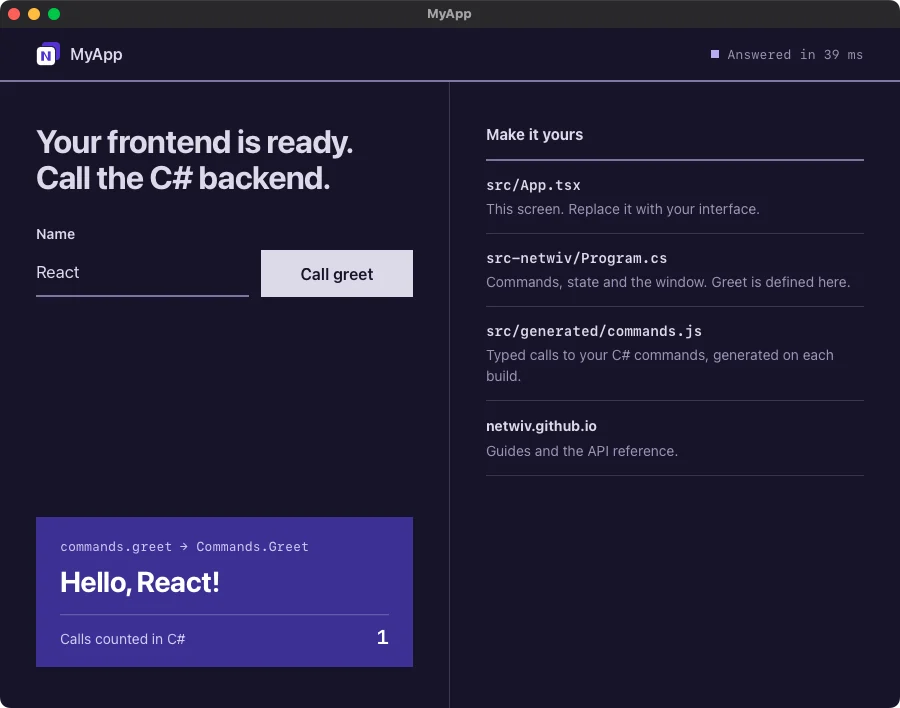
The window that opens
The React starter on macOS after one call. The frontend reached the C# greet command, which counted the call in managed state.
The smallest app
Trimmed from the templates, which also show the call state and wire the dev server.
Hover a highlighted line to see its partner.
using System.Text.Json.Serialization;using NetWiv;using NetWiv.Platform.Desktop; [assembly: CommandJsonContext(typeof(AppJsonContext))][assembly: GenerateFrontendBindings] internal static class Program{ [STAThread] private static void Main() { using var app = new Builder() .UseRuntime(new DesktopRuntime()) .Metadata(new AppMetadata("My app", "0.1.0", "dev.example.myapp")) .UseEmbeddedAssets() .UseEmbeddedConfig(EmbeddedConfigMode.Production) .InvokeHandler("greet") .Window("main", "My app", "index.html", 900, 680) .Build(); app.Run(); }} public static class Commands{ [Command] public static string Greet(string name) => $"Hello, {name}!";} [JsonSerializable(typeof(string))]public partial class AppJsonContext : JsonSerializerContext;import { useState } from 'react';import { commands } from './generated/commands.js'; export default function App() { const [message, setMessage] = useState(''); async function greet() { setMessage(await commands.greet({ name: 'World' })); } return <button onClick={greet}>{message || 'Greet'}</button>;}<script setup lang="ts">import { ref } from 'vue';import { commands } from './generated/commands.js'; const message = ref('');async function greet() { message.value = await commands.greet({ name: 'World' });}</script> <template> <button @click="greet">{{ message || 'Greet' }}</button></template><script lang="ts"> import { commands } from './generated/commands.js'; let message = $state(''); async function greet() { message = await commands.greet({ name: 'World' }); }</script> <button onclick={greet}>{message || 'Greet'}</button>import { Component, signal } from '@angular/core';import { commands } from './generated/commands.js'; @Component({ selector: 'app-root', template: `<button (click)="greet()">{{ message() || 'Greet' }}</button>`,})export class App { message = signal(''); async greet() { this.message.set(await commands.greet({ name: 'World' })); }}@page "/"@inject NetWiv.Generated.NetWivCommands Commands <button @onclick="Greet">@(Message ?? "Greet")</button> @code { private string? Message; private async Task Greet() { Message = await Commands.GreetAsync("World"); }}@inject NetWiv.Generated.NetWivCommands Commands <button @onclick="Greet">@(Message ?? "Greet")</button> @code { private string? Message; private async Task Greet() { Message = await Commands.GreetAsync("World"); }}Blazor calls C# through NetWivCommands, a typed client each build generates from the commands. Its JSON context and shared types live in the starter’s contracts/ project instead of Program.cs. Values cross JavaScript as JSON text, so long and decimal stay exact.
The blazor-hybrid starter runs this component inside the desktop process on managed .NET, on Windows, Linux and macOS, calling C# through the same generated client. It targets .NET 8 by default; set NetWivBlazorTargetFramework to net9.0 or net10.0 to move the app and its matching Microsoft component packages together. Its shared UI can also be published as WebAssembly. Hybrid with NativeAOT is experimental and needs an explicit opt-in.
CLI at a glance
| Command | What it does |
|---|---|
netwiv new NAME -t TEMPLATEnetwiv new --list# six starters | Create a project with SDK references, local CLI and feed |
netwiv dev | Run with bindings, dev server and backend restarts |
netwiv build# self-contained .NETnetwiv build --aot# NativeAOTnetwiv build --framework-dependent# installed runtimenetwiv build -t osx-arm64 -b app,dmg# target and bundles | Publish the app; bundles when the config enables them |
netwiv info | Show the CLI and .NET SDK versions, OS and config |
netwiv mcpdotnet tool run netwiv -- mcp# project CLI | Run the read-only MCP server for coding agents on stdio. New projects register the second form in .mcp.json |