빠른 시작
CLI를 설치하고, 앱을 만들고, 실행하고, 게시합니다. 이어서 서로 통신하는 가장 작은 C#과 프론트엔드 코드를 봅니다.
NetWiv는 아직 NuGet.org에 없습니다. GitHub 릴리스 페이지의 ZIP에 패키지가 들어 있고, 압축을 푼 폴더를 패키지 소스로 씁니다.
필요한 것
- .NET 8 이상 SDK
- Node.js ^20.19 또는 22.12 이상
- 운영체제 WebView: WebView2, WebKitGTK 4.1, WKWebView
패키지 받기
릴리스 페이지에서 ZIP을 받아 압축을 풉니다. 아래 명령은 다운로드 폴더에 풀었다고 가정하니, 다른 곳이면 경로만 바꾸세요. 새 프로젝트가 이 폴더를 가리키므로 지우지 마세요.
NetWiv-0.3.0-packages.zip 받기릴리스에는 ZIP을 검증할 SHA256SUMS도 있습니다.
CLI 설치
압축을 푼 폴더에서 실행합니다.
$feed에 패키지 위치가 저장됩니다. 이미 설치했다면install대신update를 씁니다.Set-Location $HOME\Downloads\NetWiv-0.3.0-packages $feed = (Resolve-Path .\packages).Path dotnet tool install --global NetWiv.Cli --version 0.3.0 --add-source $feedcd ~/Downloads/NetWiv-0.3.0-packages feed="$(pwd)/packages" dotnet tool install --global NetWiv.Cli --version 0.3.0 --add-source "$feed" export PATH="$HOME/.dotnet/tools:$PATH"앱 만들기
$feed가 남아 있도록 같은 터미널에서 실행합니다. 기본은 React이고,netwiv new --list로 스타터 6개(TypeScript의 React, Vue, Svelte, Angular와 Blazor WebAssembly, Blazor Hybrid)를 볼 수 있습니다.Set-Location $HOME # 프로젝트를 둘 폴더면 어디든 netwiv new MyNetWivApp --template react --source $feed Set-Location MyNetWivAppcd ~ # 프로젝트를 둘 폴더면 어디든 netwiv new MyNetWivApp --template react --source "$feed" cd MyNetWivApp실행
npm ci가 프로젝트의 vendor 폴더에서 @netwiv/api를 설치합니다.desktop:dev는 바인딩을 만들고 Vite를 띄운 뒤 창을 엽니다. C#을 고치면 백엔드가 다시 시작됩니다.npm ci npm run desktop:devnpm ci npm run desktop:dev게시
기본은 self-contained .NET이고,
--aot를 붙이면 NativeAOT입니다. 결과는target/에 생깁니다.dotnet tool run netwiv -- build dotnet tool run netwiv -- build --aotdotnet tool run netwiv -- build dotnet tool run netwiv -- build --aot
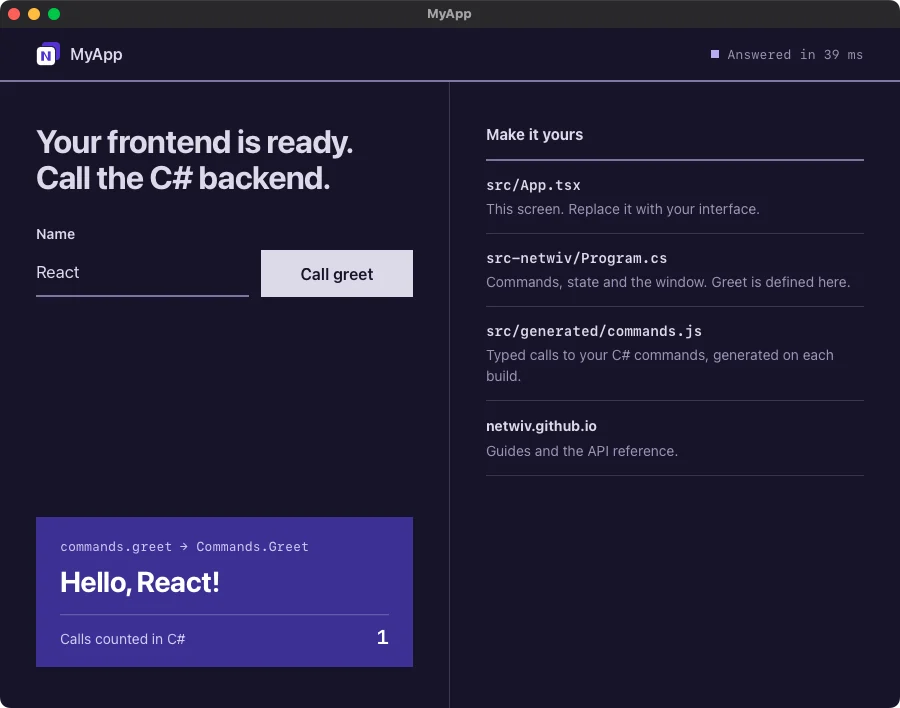
실행하면 열리는 창
macOS에서 React 스타터로 한 번 호출한 모습입니다. 프론트엔드가 C# greet 명령을 호출했고, C#이 호출 횟수를 상태로 셌습니다.
가장 작은 앱
템플릿에서 줄였습니다. 실제 템플릿은 호출 상태 표시와 개발 서버 연결도 함께 합니다.
강조된 줄에 마우스를 올리면 짝이 되는 줄이 함께 표시됩니다.
using System.Text.Json.Serialization;using NetWiv;using NetWiv.Platform.Desktop; [assembly: CommandJsonContext(typeof(AppJsonContext))][assembly: GenerateFrontendBindings] internal static class Program{ [STAThread] private static void Main() { using var app = new Builder() .UseRuntime(new DesktopRuntime()) .Metadata(new AppMetadata("My app", "0.1.0", "dev.example.myapp")) .UseEmbeddedAssets() .UseEmbeddedConfig(EmbeddedConfigMode.Production) .InvokeHandler("greet") .Window("main", "My app", "index.html", 900, 680) .Build(); app.Run(); }} public static class Commands{ [Command] public static string Greet(string name) => $"Hello, {name}!";} [JsonSerializable(typeof(string))]public partial class AppJsonContext : JsonSerializerContext;import { useState } from 'react';import { commands } from './generated/commands.js'; export default function App() { const [message, setMessage] = useState(''); async function greet() { setMessage(await commands.greet({ name: 'World' })); } return <button onClick={greet}>{message || 'Greet'}</button>;}<script setup lang="ts">import { ref } from 'vue';import { commands } from './generated/commands.js'; const message = ref('');async function greet() { message.value = await commands.greet({ name: 'World' });}</script> <template> <button @click="greet">{{ message || 'Greet' }}</button></template><script lang="ts"> import { commands } from './generated/commands.js'; let message = $state(''); async function greet() { message = await commands.greet({ name: 'World' }); }</script> <button onclick={greet}>{message || 'Greet'}</button>import { Component, signal } from '@angular/core';import { commands } from './generated/commands.js'; @Component({ selector: 'app-root', template: `<button (click)="greet()">{{ message() || 'Greet' }}</button>`,})export class App { message = signal(''); async greet() { this.message.set(await commands.greet({ name: 'World' })); }}@page "/"@inject NetWiv.Generated.NetWivCommands Commands <button @onclick="Greet">@(Message ?? "Greet")</button> @code { private string? Message; private async Task Greet() { Message = await Commands.GreetAsync("World"); }}@inject NetWiv.Generated.NetWivCommands Commands <button @onclick="Greet">@(Message ?? "Greet")</button> @code { private string? Message; private async Task Greet() { Message = await Commands.GreetAsync("World"); }}Blazor는 빌드할 때마다 명령에서 생성되는 타입 C# 클라이언트 NetWivCommands로 C#을 호출합니다. JSON 컨텍스트와 공유 타입은 Program.cs 대신 스타터의 contracts/ 프로젝트에 둡니다. 값은 JSON 텍스트로 JavaScript를 지나가므로 long과 decimal도 정확히 유지됩니다.
blazor-hybrid 스타터는 이 컴포넌트를 데스크톱 프로세스 안에서 managed .NET으로 실행하며, Windows, Linux, macOS에서 같은 생성 클라이언트로 C#을 호출합니다. 기본 대상은 .NET 8이며, NetWivBlazorTargetFramework를 net9.0이나 net10.0으로 바꾸면 앱과 짝이 맞는 Microsoft 컴포넌트 패키지가 함께 바뀝니다. 공유 UI는 WebAssembly로도 게시할 수 있습니다. Hybrid의 NativeAOT는 실험적이며 명시적으로 켜야 합니다.
CLI 한눈에
| 명령 | 하는 일 |
|---|---|
netwiv new NAME -t TEMPLATEnetwiv new --list# 스타터 6개 | SDK 참조, 로컬 CLI, 피드를 갖춘 프로젝트 생성 |
netwiv dev | 바인딩, 개발 서버, 백엔드 재시작과 함께 실행 |
netwiv build# self-contained .NETnetwiv build --aot# NativeAOTnetwiv build --framework-dependent# 설치된 런타임netwiv build -t osx-arm64 -b app,dmg# 대상과 번들 형식 | 앱 게시. 설정에서 켜면 번들도 생성 |
netwiv info | CLI·.NET SDK 버전, OS, 설정 보기 |
netwiv mcpdotnet tool run netwiv -- mcp# 프로젝트 CLI | 코딩 에이전트용 읽기 전용 MCP 서버를 stdio로 실행. 새 프로젝트의 .mcp.json은 두 번째 방식으로 등록함 |